

Increase Your Engagement with These 8 Essential Tips for Creating an Effective Link in Bio Page That Resonates with Your Audience
To effectively market your products or services, planning and using tools that represent your brand are essential. In today’s digital era, where audience attention is highly competitive, having a well-structured Link in Bio can be the key to boosting engagement and attracting more followers. Whether for a personal profile, a business, or a brand, directing your visitors to the right links can make a significant difference in your online growth.
Today, we’re sharing some of the best tips to optimize your Link in Bio and demonstrating how you can use our feature on Xcurt to create a professional, customizable page that truly works for you. If you want more clicks, more conversions, and increased visibility, keep reading to discover how to turn your Bio into a powerful digital hub!
A Link in Bio is one of the most strategic spaces to guide your audience to relevant content, increase conversions, and improve engagement. However, to achieve the best results, a well-planned and optimized design is essential. Here are eight tips to enhance your Link in Bio design and maximize its impact.
1. Use a Simple and Organized Layout
Avoid excess information and visual clutter. A clean and intuitive layout helps visitors quickly find what they’re looking for. Use strategic white space to clearly highlight each link.
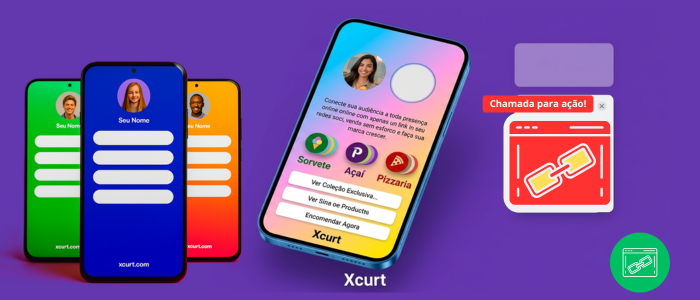
To ensure your Link in Bio page is both attractive and functional, Xcurt allows you to create a simple, intuitive, and well-organized layout.
📌 Highlight the most important links to facilitate navigation.
📌 Avoid visual clutter by choosing a clean and minimalist design.
📌 Use proper spacing to ensure elements are well-distributed.
A well-structured layout enhances the user experience and increases the chances of clicks and conversions.
2. Choose Strategic Colors and Typography
Colors and fonts should align with your brand’s visual identity. Contrasting colors help highlight action buttons, while readable fonts ensure smooth navigation.
The visual identity of your Link in Bio page directly influences how your audience perceives it. With Xcurt, you can customize colors and fonts to create a unique and professional design.
🎨 Colors: Choose tones that convey your brand’s message and improve readability.
🔤 Typography: Opt for readable fonts that match your style.
⚡ Contrast & Harmony: Use strategic combinations to highlight important buttons and links.
A well-thought-out visual choice enhances the user experience and strengthens your digital identity.
🔹 Stand out with a Professional and Strategic Link in Bio!
Having a well-structured Link in Bio makes all the difference in increasing your engagement and directing your audience to where it really matters. With Xcurt, you can customize your page, add multiple links, integrate social networks and track metrics to optimize your results. Get a step ahead of the competition and transform your online presence now! 🎯
3. Create Attractive and Eye-Catching Buttons
Buttons should be large enough for mobile taps and include clear calls to action, such as "Access Now" or "Exclusive Discount". Use engaging designs to encourage clicks.
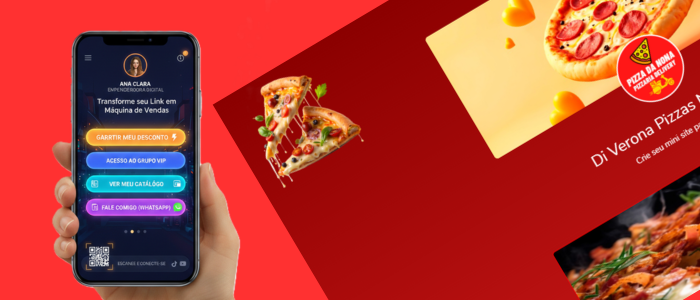
Buttons are the main interactive elements on your Link in Bio page, and with Xcurt, you can customize them to increase clicks and engagement.
🔥 Use contrasting colors to highlight the most important buttons.
📏 Adjust size and shape to make them visually appealing and accessible.
🖱️ Add subtle animations to encourage visitor interaction.
🔤 Include CTAs (Calls to Action) like "Access Now" or "Check it Out" to guide your audience.
Well-designed buttons increase conversion chances and make the user experience much more intuitive!
4. Personalize Your Link in Bio
Using Xcurt’s link shortener feature allows you to create custom, SEO-friendly URLs, making your links more memorable and trustworthy for your audience.
Personalizing your Link in Bio is essential to reinforcing your visual identity and making your page more professional. With Xcurt, you can create a unique and exclusive link to highlight your brand.
🔗 Choose a custom URL so your link is easy to remember.
🎨 Adjust colors, fonts, and images to maintain your brand's visual identity.
📌 Organize your links so the most important ones stand out.
A well-personalized page increases credibility, enhances user experience, and boosts engagement!
5. Prioritize the Most Important Links
Avoid adding too many links, as this can confuse users. Highlight the most relevant ones and update them regularly according to your marketing strategies and active campaigns.
To ensure your audience quickly finds what they’re looking for, it's essential to highlight the most relevant links on your Link in Bio page. With Xcurt, you can strategically organize your links to maximize clicks and conversions.
✅ Place essential links at the top, such as your website, WhatsApp, or main offer.
📌 Use visual highlights to draw attention to promotions or new content.
📊 Analyze performance and adjust the order of links based on received clicks.
Make navigation easy and guide your visitors to where it truly matters!
Start for Free, Upgrade Later! 🔗✨
Create your Link in Bio now on Xcurt, with no initial cost! Customize, add your links, and explore all the features. Want even more benefits? Upgrade to a premium plan and unlock exclusive features!
👉 Try it free for 2 days and discover what works best for you!
Note: Sometimes the test may not be available on the platform!
🚀 Total Freedom on Xcurt for Only R$ 8.55! 🔗✨
With a plan for just R$ 8.55 you can remove ads and work without interruptions in your admin panel. Gain more focus, productivity, and a premium experience to manage your Links in Bio with total freedom!
Discover the Benefits of the START II Plan on Xcurt! 🔗
With the START II Plan, you unlock exclusive features to optimize your experience and professionalize your Link in Bio page. Here are some of the benefits:
✅ More QR Codes – Generate 10 custom QR Codes per month to share your links more efficiently.
✅ Ad Removal – Work without interruptions and stay focused in the admin panel.
✅ Premium Themes – Access exclusive designs to highlight your brand’s visual identity.
✅ Advanced Analytics – Track detailed metrics and optimize your results.
✅ More Space for Links – Add more links and organize everything intuitively.
💡 Take advantage of all these benefits and take your digital strategy to the next level!
👉 Upgrade now and enjoy all the perks! 🔥
6. Add Impactful Visual Elements
The appearance of your Link in Bio page makes all the difference in user experience. With Xcurt’s features, you can include visual elements that make your page more attractive and engaging.
Images, videos, and icons can make the page more visually appealing and interactive. Use graphics that complement the links and guide users intuitively.
🖼️ Images & Icons: Use logos, photos, and icons to highlight your links.
🎨 Custom Backgrounds: Choose colors, gradients, or background images to make the page unique.
🔥 Subtle Animations: Add effects to buttons to catch visitors' attention.
Well-chosen visual elements help strengthen your brand identity and make your page more professional and memorable!
7. Mobile Optimization
We know that most visits happen via smartphones, so ensure your Link in Bio page loads quickly and has a responsive design for different screen sizes.
Today, most users access Link in Bio pages via mobile devices. That’s why Xcurt continuously updates to ensure 100% responsive pages, offering the best experience for you and your visitors.
📱 Auto-adjusts to different screen sizes without losing quality.
⚡ Smooth and fast navigation, with no lags.
🔘 Easy-to-click buttons and links, improving mobile accessibility.
With a mobile-friendly design, you ensure that your audience enjoys a seamless and efficient experience on any device!
8. Track Link Performance
Use tracking tools like Xcurt to analyze click metrics and engagement. With this data, you can adjust your strategy and optimize links for better results.
Knowing which links generate the most clicks and engagement is crucial for optimizing your digital strategy. With Xcurt, you can monitor detailed real-time metrics and make smarter decisions.
It’s not enough to just create a Link in Bio page; you need to understand how your audience interacts with it. Xcurt provides in-depth analytics to help you optimize every click.
📊 Complete reports on clicks and visits.
📈 Identify your most popular links and adjust your page for better results.
🎯 Optimize your strategy based on performance data.
With this information, you can test, tweak, and maximize the impact of your Link in Bio page!
🎯 Editor’s Tip: How to Get the Best Results with Your Link in Bio on Xcurt!
Investing in your Link in Bio page design can significantly increase engagement and conversions. By following these eight tips, you'll create a more intuitive and attractive experience for your followers, making navigation more efficient and persuasive.
To ensure your Link in Bio page is effective and generates more clicks, follow these recommendations:
✅ 1. Choose a Professional Design – Use themes that match your brand identity and maintain a clean, organized layout.
✅ 2. Prioritize Essential Links – Place the most important links at the top for easy access.
✅ 3. Use Clear Calls to Action (CTAs) – Phrases like "Access Now!" or "Download for Free!" boost engagement.
✅ 4. Customize with Icons & Buttons – Make navigation intuitive with visual elements.
✅ 5. Monitor Your Stats – Xcurt lets you track clicks and optimize your strategy for better results.
💡 Extra Tip: Integrate your social media and use a QR Code to share your Link in Bio page quickly and easily! 🚀🔗