
🎯 Customize Your Links
✅ What is a custom alias?
An alias is the final part of a shortened link (e.g., xcurt.com/yourlink). Instead of something like xcurt.com/abc123, you can use something more meaningful such as xcurt.com/summer-sale or xcurt.com/mylink.
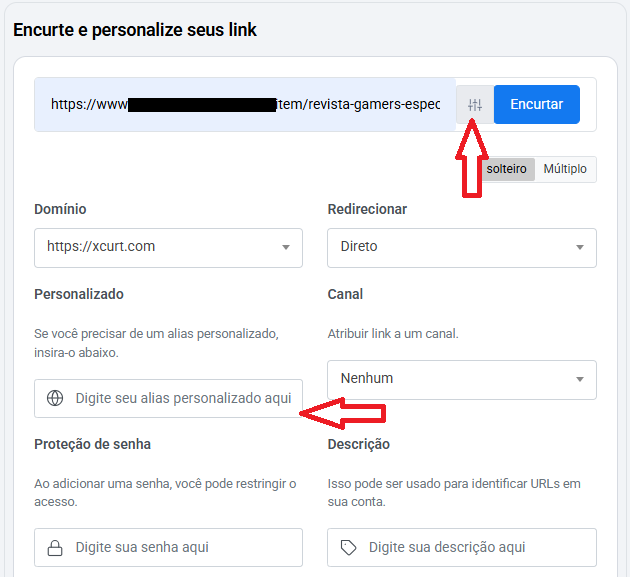
🧭 Step-by-step: How to create a custom alias
Log in to your Xcurt account
Go to your Xcurt dashboard and sign in normally.Click on “Create new link”
On your main dashboard, click the button to add or shorten a new link.Paste the original URL
Paste the link you want to shorten (e.g., a website, video, product, or profile).
Then, click on the toolbox icon in the top right corner to find the option to customize your link.Choose a custom alias
In the “Custom alias” or “Short link” field, enter the name you want to appear at the end of your shortened URL.Example:
myproduct-sale,bio-juliana,youtube-channel.Your final link will look like this:
https://xcurt.com/myproduct-saleClick “Shorten” or “Save”
Xcurt will check if the alias is available. If it is, your custom link will be created instantly!
🔒 Tips and Best Practices
Use only letters, numbers, and hyphens (-) in your alias.
Avoid names that are too long or generic.
Choose something unique and related to the link’s content.
Aliases are exclusive — once taken, they can't be reused by other users.
If the alias is unavailable, try variations like:
summer-sale-2025,mylink01, etc.
💡 Practical Example
| Purpose | Original URL | Custom Alias | Final Link |
|---|---|---|---|
| Store promotion | https://mystore.com/promo-2025 | store2025 | xcurt.com/store2025 |
| YouTube channel | https://youtube.com/channel/abcd1234 | julianachannel | xcurt.com/julianachannel |
| Affiliate page | https://product.com/affiliate=123 | specialoffer | xcurt.com/specialoffer |
| Instagram bio link | https://xcurt.com/page/juliana-links | julianabio | xcurt.com/julianabio |
📌 Important
If the desired alias is already in use, the system will notify you. Try a different version or add numbers to make it unique.
📞 Need help?
Visit the Help Center or contact our support team via email.
We're ready to help you shorten links with style and ease.