
🌐 How to Create a Professional Landing Page with Xcurt
Turn visitors into customers with a smart and visually striking landing page
If you want to capture more leads, increase your conversions, and make your digital campaigns far more effective, creating a landing page is an essential step. And with Xcurt, the process is fast, intuitive, and full of creative possibilities.
In this guide, we’ll show you how to create a high-performing landing page using Xcurt’s tools — and why this platform is the ideal choice for those who want to combine design, customization, and results.
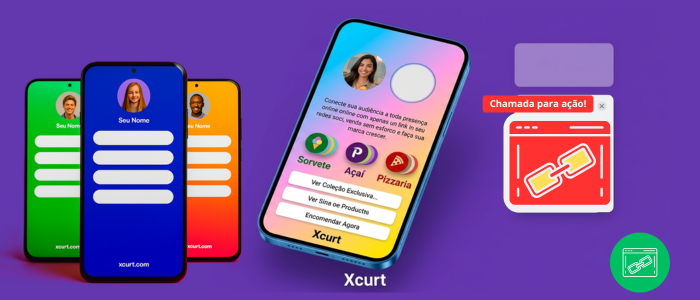
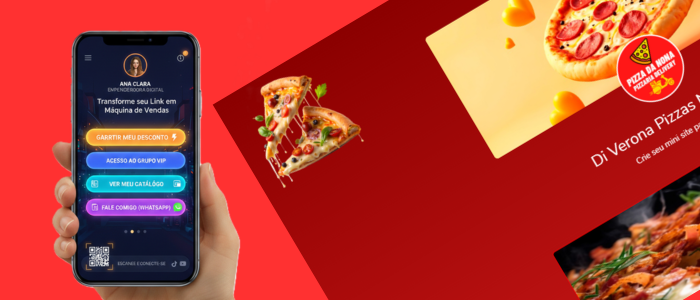
Landing pages created with Xcurt
Landing pages are the turning point between curiosity and conversion. They give every ad, email, and QR code a strategic destination — with engaging text, impactful visuals, and calls to action that inspire immediate response.
For marketing teams, the real challenge isn’t creating a single page, but keeping dozens (or hundreds) of them consistent, customized, and aligned with brand identity — without losing agility or trackability.
That’s where Xcurt makes all the difference.
The platform offers a simple, visual, no-code way to create, publish, and manage landing pages at scale.
With just a few clicks, you can pair each page with short links and custom QR Codes, monitor performance in real time, and adjust your campaigns based on real data.
The result? Integrated campaigns, faster launches, and much clearer ROI insights — all without relying on technical teams or complex tools.
👉 In this guide, you’ll learn — step by step — how to create landing pages that truly convert, using the full power of the Xcurt platform.
🚀 What is a landing page?
A landing page is a page created with a single, specific goal: converting visitors.
It can be used to collect emails, sell a product, promote an event, present a service, or highlight a new launch.
Unlike a traditional website, a landing page focuses entirely on one action, which significantly increases conversion rates.
With Xcurt, you can create this type of page in minutes using ready-made templates, dynamic widgets, and full customization — no coding required.
🧠 Why use Xcurt to build your landing page?
Xcurt goes far beyond a simple link shortener.
It has evolved into a complete platform for creating and managing pages, including link-in-bio pages, landing pages, and business mini-sites.
Here’s what makes Xcurt stand out:
🧩 Smart visual builder: drag, edit, and publish in minutes.
🎨 Fully customizable design: colors, fonts, backgrounds, and animations tailored to your brand.
⚙️ Dynamic widgets: add buttons, videos, forms, countdowns, and more.
📊 Real-time analytics: track clicks, traffic sources, and page performance.
🔗 Custom domains: publish using your own URL or the Xcurt domain.
📱 Full mobile compatibility.

Mariano Alves
Transform your digital presence with Xcurt — create links, QR codes, and landing pages that truly convert.
Made with 💜 by team of Xcurt
🧩 Step-by-Step: Creating Your Landing Page on Xcurt
1. Access your Xcurt account
Log into your Xcurt account (or create one for free).
In the main dashboard, go to “Pages” > “New landing page.”
2. Choose a template
Xcurt offers several ready-made templates designed for different goals:
Lead capture
Product launch
Sales page
Event or workshop
Seasonal campaign
You can also start from scratch if you prefer complete creative freedom.
3. Customize the design
In the visual editor, you can modify:
Background image (or use videos and animated gradients)
Colors and typography that match your brand
Logo, icons, and banners to reinforce your visual identity
💡 Xcurt Tip: Use motion elements and visual cues (like pulsing buttons and clear, persuasive text) to capture more attention.
4. Add your blocks and widgets
Drag and drop the components you need:
🖋️ Custom text and headings
📸 Image or video gallery
💬 Contact or signup forms
⏱️ Countdown timers for campaigns
🛒 Purchase buttons with smart redirects
🔗 QR Codes and short links integrated with social media
Each block can be configured individually, including automatic actions such as opening links, redirecting after submission, or showing pop-ups.
5. Set up redirection
You can define a custom destination URL (ideal for tracking ad campaigns) and connect the page to your own domain.
Xcurt also allows automatic UTM parameter creation, making it easier to analyze traffic in tools such as Google Analytics and Meta Ads.
6. Enable tracking and statistics
Every landing page created with Xcurt includes real-time insights, such as:
Clicks and views
Visitor geographic origin
Conversion rates
Devices and access times
These metrics help you adjust your campaigns and improve results continuously.
7. Publish and share
Click “Publish”, copy your short link or QR Code, and start promoting!
You can share it on Instagram, WhatsApp, TikTok, email, or ads — Xcurt generates everything automatically.
🧮 Practical examples of pages created with Xcurt
Course Launch Campaign: countdown timer, presentation video, and enrollment button.
Event Page: interactive map, signup button, and calendar integration.
Store Promotion: animated banners, WhatsApp button, and automatic discount coupon.
Premium link in bio: transformed into a complete landing page with product carousel.
Each example highlights the flexibility and customization power of Xcurt’s page builder.
💼 Integrations and automations
Xcurt integrates with external tools such as:
Email marketing platforms (Mailchimp, Brevo, ActiveCampaign)
Lead automation via Webhooks
Facebook Pixel and Google Tag Manager
WhatsApp Business and Telegram integrations
These features allow you to create automated funnels, saving time and boosting campaign performance.
🧱 Advanced design and UX features
Visual experience is a decisive factor in the success of any landing page.
With Xcurt, you can:
Add smooth animations with entry and scroll effects
Create interactive sections based on visitor behavior
Use responsive layouts optimized for mobile and desktop
Apply smart gradients and premium themes (for subscribers)
All this in a simple, intuitive, no-code environment.
📈 Golden tips to increase conversions with your Xcurt page
Create a clear and direct offer — avoid excessive text and focus on one single goal.
Use strong call-to-action buttons like “I want to join” or “Download now.”
Test variations of colors and headlines — small adjustments can produce big differences.
Add social proof — testimonials, numbers, and reviews build trust.
Track your metrics in the Xcurt dashboard and optimize continuously.
🏁 Smart investment: your landing page ready to convert
With Xcurt, anyone can create a professional landing page in minutes, without relying on expensive designers or developers.
The platform offers everything you need — modern design, smart widgets, real-time statistics, and full integration with your campaigns.
Whether your goal is selling, capturing leads, promoting, or engaging, Xcurt turns your idea into a complete digital experience.
Turn clicks into customers with Xcurt landing pages
Landing pages are the turning point between curiosity and conversion.
They give every ad, email, and QR code a strategic destination — with engaging text, impactful visuals, and calls to action that inspire immediate response.
For marketing teams, the true challenge isn’t creating a single page, but managing dozens (or hundreds) of them consistently, personally branded, and aligned with identity — without losing agility or measurability.
That’s where Xcurt makes all the difference.
The platform offers a simple, visual, no-code way to create, publish, and manage landing pages at scale.
With just a few clicks, you can pair each page with short links and custom QR Codes, monitor performance in real time, and adjust campaigns based on real data.
The result? Integrated campaigns, faster launches, and much clearer ROI — without depending on technical teams or complex tools.