
To add tags to a shortened and customized link in Xcurt, you’ll follow a process that generally involves editing the link’s properties after it has been created (or during creation, if the option is available in your plan).
Here are the most likely steps, based on the advanced features of our link shortening platform:
How to Add Tags to a Short and Customized Link in Xcurt
Log into Your Xcurt Account
Visit the Xcurt website and log in with your credentials.Access Your Link List
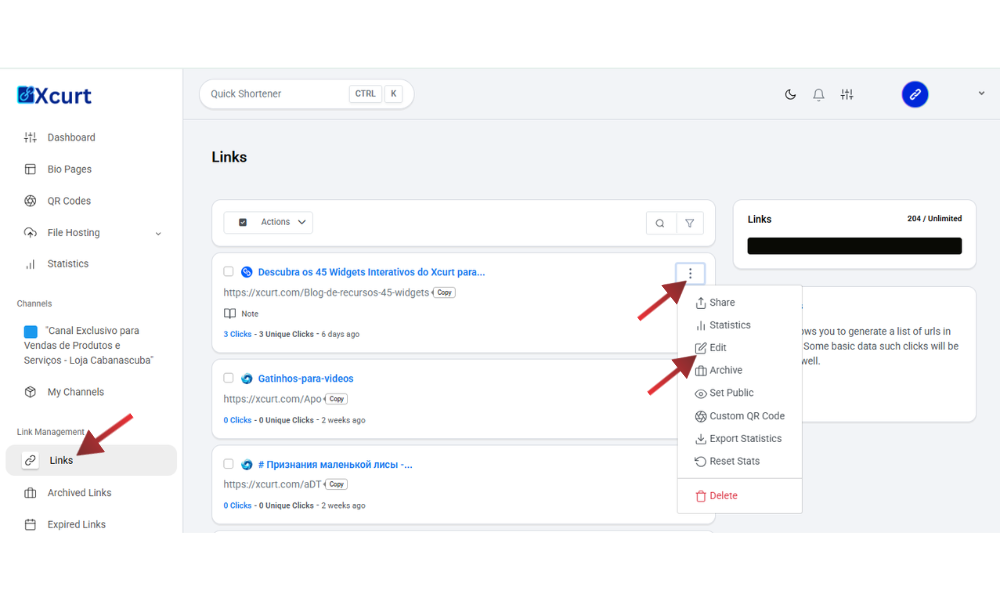
In your account dashboard, look for a section that displays all your shortened links. Usually, this appears as a table or list where you can see the original link, the short link, number of clicks, etc.Locate the Desired Link
Find the shortened and customized link to which you want to add tags.Edit the Link Properties
Next to each link, look for an edit icon (typically a pencil), a gear icon, or the three-dot menu (…) mentioned in previous articles. Click this icon to open the editing or link details panel.Find the "Tags" Field
Inside the link editing options, you should find a specific field for “Tags”, “Labels”, or “Keywords.” This might be a text box where you can type the tags, separating them with commas or pressing "Enter" after each one.Example tags: summer-campaign, new-product, social-media, digital-marketing, blog, promotion
Add Your Tags
Enter the tags you want to associate with the link. Think of keywords that describe the link's content or the campaign it belongs to.Save the Changes
After adding your tags, be sure to click a button like “Save,” “Update Link,” or “Apply Changes” so the tags are properly saved to your link.
Why Add Tags?
Adding tags is an excellent practice for organizing and managing your links. With tags, you can:
Filter and Find Links Easily
If you manage hundreds of links, tags allow you to quickly filter and find all links related to a specific campaign, product, or time period.Analyze Performance by Category
You can group links by tags to analyze the performance of different types of content or marketing strategies.Improve Internal Visibility
Tags help you and your team quickly understand the purpose of each link.