
Shortening a link on Xcurt is simple and intuitive. Although I can’t interact directly with the platform, here’s a step‑by‑step guide to what you’ll typically see:
1. Log In to Your Xcurt Account
First, go to the Xcurt website and log in with your email/username and password. (If you don’t have an account yet, you’ll need to create one.)
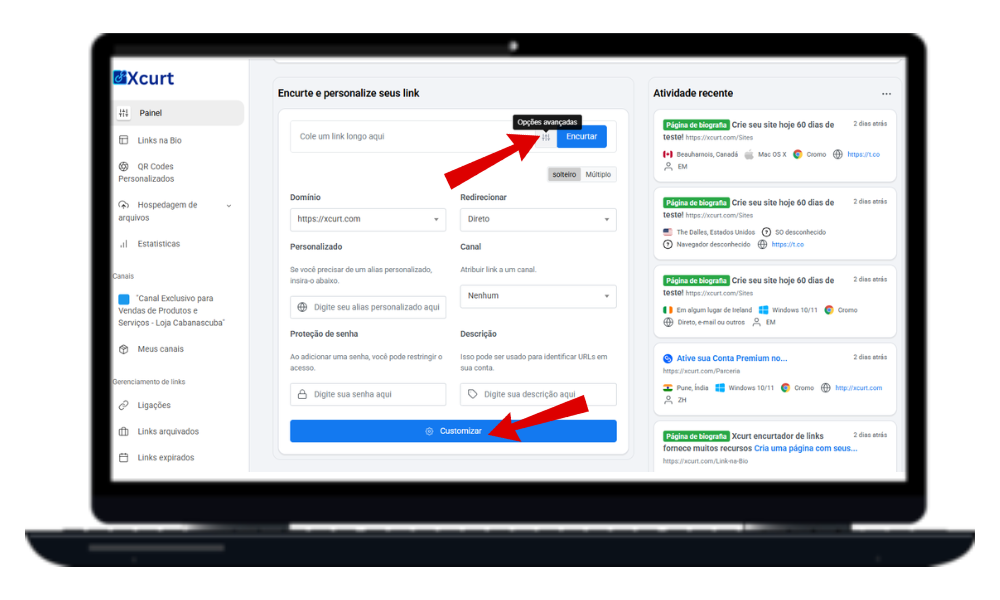
2. Find the “Shorten Link” Option
Once logged in, look for a button or menu item labeled “Shorten Link,” “Create New Link,” or “New Short URL.” It’s usually highlighted on your main dashboard.
3. Paste Your Long URL
You’ll see a text field where you can paste the original long link you want to shorten (e.g., https://www.yoursite.com/a-very-long-page-with-many-parameters).
4. Customize (Optional but Recommended)
Before finalizing, Xcurt lets you:
Add a Custom Alias: Instead of a random code (
xcurt.com/ghjkl), choose something memorable (xcurt.com/my‑promo).Use a Custom Domain (Premium): If you’ve set up your own domain (e.g.,
yourbrand.com/promo), select it here.Add Title/Description: Helps you organize links within the platform.
Set Password Protection: Require users to enter a password for sensitive content.
Schedule Expiration: Make the link expire after a date or a certain number of clicks.
5. Generate the Short Link
Click “Shorten,” “Create,” or “Generate Link.”
6. Copy and Share!
Xcurt immediately provides your new short link. Copy it and share it anywhere—social media, emails, messages, printed materials, and more.
Extra Tips for Optimizing Your Links on Xcurt
1. Explore the Toolbox (Customization Options)
Look for an icon with three dots (or a gear). Clicking it opens advanced settings:
Custom Alias (
xcurt.com/special‑promo)Password Protection
Link Expiration (date or click limit)
Custom Domain (
yourbrand.com/offer)Advanced Redirects (send users to different pages based on device or location)
2. Leverage Detailed Tracking
After shortening, check your Xcurt analytics to see:
Total clicks
Geolocation of visitors
Devices used (mobile, desktop, etc.)
Peak hours of activity
These insights help you refine future campaigns.
3. Stay Organized
If you’ll shorten many links, organization is key:
Folders: Group links by project, campaign, or client.
Tags: Add tags for easy searching and categorization.
With these features, you’ll keep your link library tidy and find any URL quickly—even among hundreds.