
Turn Your Link in Bio Page into a Sales Funnel
Transforming your Link in Bio page into a sales funnel is a powerful strategy—especially on platforms like Instagram and TikTok, where you’re only allowed one clickable link in your bio. The idea is to guide your audience through a journey—from the first contact to converting them into a customer or an engaged follower.
1. What Is a Link in Bio Page?
A Link in Bio page (which Xcurt provides!) is a central hub for your important links. Instead of just one link to your website, you can create a personalized page that includes multiple key links: to your e-commerce store, WhatsApp, blog, other social media platforms, current promotions, and more.
2. How to Turn Your Link in Bio Page into a Sales Funnel
To make your Link in Bio function as a funnel, you need to think about your customer’s journey and the logical steps they should follow.
a) Top of the Funnel: Attract and Offer Value
The first goal is to attract as many people as possible to your Bio page and grab their attention.
Valuable & Free Content: The first link(s) should offer something valuable for free or at a low cost. This draws people into your "world."
Examples: Free e-book, free webinar, downloadable checklist, free sample, a first-purchase coupon, or a link to your best blog article.Clear Call to Action (CTA): In your post or Stories, direct users to your Bio using CTAs like:
“Click the Link in Bio to download the full guide!” or “Get your exclusive discount — Link in Bio!”
b) Middle of the Funnel: Engage and Qualify
Once someone clicks the first link and receives some initial value, the next step is to engage them more deeply.
Link to Educational Content: If they downloaded an e-book, your next link could be to a related blog post, a YouTube video with more depth, or a podcast episode.
Invite to a Community: Link to your Telegram/WhatsApp group or your email newsletter. This builds relationships and opens a more direct communication channel.
Testimonials/Success Stories: If applicable, add a link to a page with customer testimonials or case studies. This adds social proof.
c) Bottom of the Funnel: Convert and Sell
Now that your audience is engaged and familiar with your product/work, it’s time to offer your main solution.
Direct Links to Products/Services: Add links to your online store, service sales page, consultation booking, or product checkout page.
Limited-Time Offer: If there’s a special offer or promo, highlight it with a clear link and a sense of urgency.
WhatsApp for Sales/Support: A direct link to your WhatsApp can be highly effective for answering questions and closing sales in a more personal way.
📌 How to Create a Link in Bio Page on Xcurt?
1. Do I need a Xcurt account?
Yes. To create your page, first log in or create a free account at xcurt.com.
2. Where can I find the Link in Bio option?
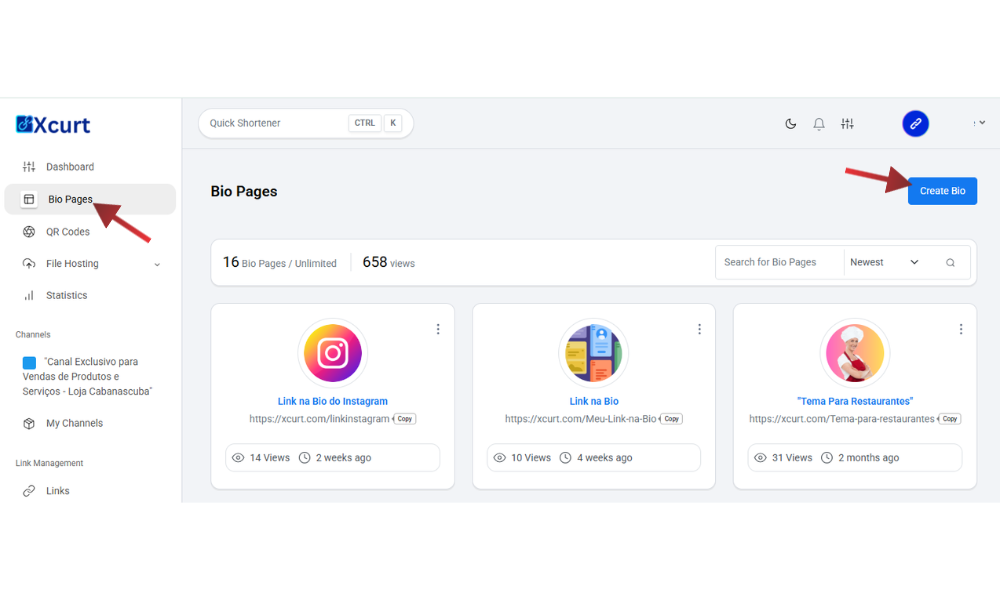
After logging in, go to the side menu and click on “Link in Bio” or “Create Page”. It’s simple — just follow the menu in your admin dashboard! (See image below)
3. How do I start building my page?
Click “New Page”, choose a name for your page (e.g., yoursite.xcurt.com/yourname), and select a visual theme.
4. How do I add my links?
Inside the page editor, click “Add Link or Content”, paste the desired URL, add a title (e.g., “My WhatsApp”, “Online Store”), and save.
5. Can I customize the visual style?
Yes! You can change the colors, profile photo, icons, and the order of your links to match your brand.
6. How do I publish my page?
Once everything is set, click “Save” or “Publish”. (Note: Some features save automatically.) Your link will be ready to use on Instagram, TikTok, and other social bios.
7. Can I track the clicks?
Yes. Go to your dashboard and view detailed statistics for each link — total clicks, source, times, and more.
3. Essential Tips to Use Your Link in Bio Page as a Funnel
Prioritize: Place the most important and clickable links at the top of your Bio page. The order matters!
Clarity & Strong Titles: Use clear, attention-grabbing titles for each link (e.g., “Download My Free E-book,” “Shop Now,” “Contact Us on WhatsApp”).
Attractive Design: If Xcurt allows visual customization (colors, profile picture), use it to match your brand’s identity.
Constant Analysis: Use Xcurt’s click stats to see which links are performing best. If a link isn’t getting clicks, reorganize it, change the CTA, or replace it.
Keep It Updated: Your Bio page should reflect your current campaigns and priorities. Remove outdated links and add new ones.
One Focus Per Post: Although your Bio may have many links, each social media post should focus on one specific goal. If your post is about an e-book, the CTA should guide people to download that e-book in your Bio.
By following these steps, your Xcurt Link in Bio page will stop being just a list of links and start functioning as a strategic tool to guide your audience and boost your sales and goals.